 ProductAd
Why choose ProductAd for an existing product?
Reuse one product’s details and images across original and template-based video ads, with supporting image creatives. This suits small teams that want to reduce repeated material collection and content preparation.
- Import or upload, check the product information and save the product.
- Select that saved product for an original video or a video-template workflow.
- Reuse authorised photos for image ads and posters; check which fields each workflow actually uses.
This record checks repeated original-video requests using the saved Acme photo. It does not yet verify a complete template-video and image-ad output set, or automatic synchronisation between projects.
Import depends on the source page being accessible and the information it exposes. If a page cannot be read or a field is missing, add the product details and authorised photos manually, then continue to video creation.
Acme Mug: a watermark-free presenter video →On this page
How does ProductAd turn a product URL into a video ad?Product link to a complete video: AllbirdsCan I try watermark-free product video ads for free?ProductAd workflow and video settingsStart with your source assetsCompare by taskTest your own productSources and scopeAllbirds product link to a complete 5-second English ad with an AI presenter. The credit ledger recorded 600 credits for the request.
Verified inputs and results
Product link to a complete video: Allbirds
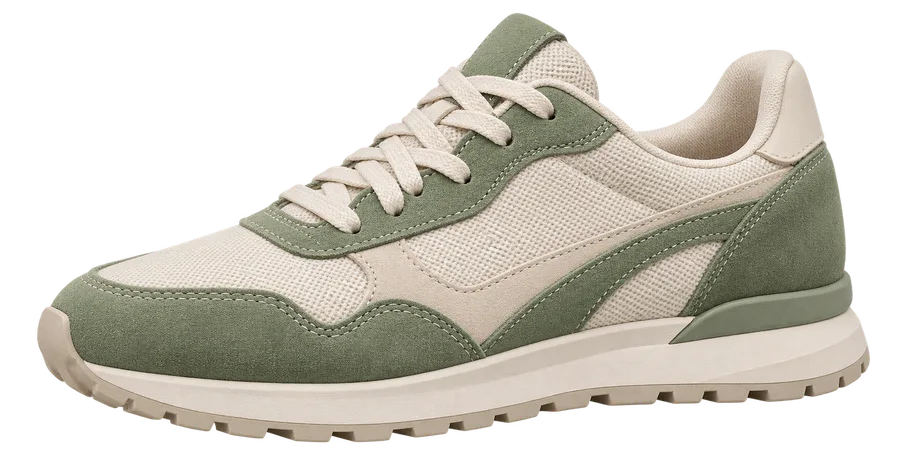
ProductAd imported the Men's Tree Runner product link. The team saved the product, selected an imported image and generated a playable five-second English ad in Product-led Video mode. A presenter appears while the shoe remains the focus.
Acme Mug: a watermark-free presenter video
Created from one product photo and saved mug details. This is a ProductAd team demonstration, not a customer endorsement or a product-link import test.
Estimated credits
The video form estimates 120 credits per second: a 4-second request shows 480 credits. This is a per-request estimate, not the total cost of an accepted result; revisions may need additional requests.
These team tests do not establish a quality or cost advantage over competing tools. Total credits across retries and total production time have not been measured.
Start with your source assets
I have product photos.
Compare photo-led creation and inspect shape, color and labels.
I have a product page.
Check import accuracy and keep a manual preparation option.
I need a presenter.
Compare delivery, language and how the product appears.
I already have footage.
Prioritize editing, captions, audio and revision controls.
Compare by task
Compare the workflows by the materials you already have and the ad you need. Test results describe the specific workflow and conditions we tried.
| Tool | Official workflow and plan information | What we observed in testing |
|---|---|---|
| ProductAd | Product-link import → watermark-free product video ads; photo input and a free registration trial also supported | Allbirds product link to a complete 5-second English ad with an AI presenter. The credit ledger recorded 600 credits for the request. See the 5-second test →Matched Acme photo-and-brief test: ProductAd produced a complete five-second presenter-led video. Acme Mug: a watermark-free presenter video → |
| Creatify |
Product URL → assets and selling points → script → avatar video. Edit scripts, captions, trims, media and layout. AI regeneration uses credits; manual edits and re-exports are described separately. Free: 10 monthly credits, watermarked exports. Standard displays $10/month under annual savings, 55 credits/month; confirm checkout. Official workflow ↗ · Pricing and plans ↗ |
Same Acme photo and brief. The Ad Agent produced a keyframe and asked for a paid plan before video rendering. The classic route asked for at least three images or one video. |
| Topview |
Product photo + avatar placement → script and voice → presenter video. Adjust product size and placement before generation; enter script and voice or upload audio. Post-export editing was not independently tested. Plus: $36/month billed annually at $432, 100 credits/month. Free export and watermark conditions were not established by this review. Official workflow ↗ · Pricing and plans ↗ |
We have yet to verify a complete output in this test. |
| Invideo |
Product brief and assets → script, visuals and audio on an editable timeline. Write or revise scripts, then trim, reorder and replace scenes on the timeline; edit directly or instruct the agent. Ad-maker FAQ lists limited free creation and exports; free watermark conditions remain unverified. Regional pricing displayed Starter at €10/seat/month billed annually, 400 credits/seat/month; check currency and checkout. Official workflow ↗ · Pricing and plans ↗ |
We have yet to verify a complete output in this test. |
| Arcads |
Single product image → actor presentation, unboxing or cinematic product shots. Photo-led actor, unboxing and product shots; trim, stitch, resize and text-overlay tools are listed. Exact output controls were not independently tested. Card-required trial: 1,000 credits for 72 hours, then automatic Starter billing unless cancelled. Starter lists 8,000 monthly credits; current money prices are in-app. Watermark terms not independently verified. Official workflow ↗ · Pricing and plans ↗ |
We have yet to verify a complete output in this test. |
ProductAd ·
Product link to a complete video: Allbirds
ProductAd imported the Men's Tree Runner product link. The team saved the product, selected an imported image and generated a playable five-second English ad in Product-led Video mode. A presenter appears while the shoe remains the focus.
The billing record shows 600 credits. The video was first observed ready about 13 minutes 20 seconds after the debit. This interval is based on observations and does not measure server render time.
The complete shoe is visible in the reviewed frames, including the end frame. Automatic transcription matched the submitted line. ProductAd team demonstration with no brand endorsement.
Can I try watermark-free product video ads for free?
Sign up to try watermark-free AI product video ad creation for free. Start with a product link or your own photos.
Free trial details
New users receive 600 credits when they register with ProductAd. Use these credits to try AI product video ad creation for free. At the current estimate of 120 credits per second, a 4-second video request uses 480 credits, leaving 120; a 5-second request uses 600. This covers a generation request, not unlimited videos or guaranteed results. Check the estimate before submitting; regenerating uses additional credits.
Register, check your credit balance, import a product link or add your photos, then choose Video Ad Creation and a 4- or 5-second duration. Review the full result before using it. Registration credits are separate from paid subscription trials.
ProductAd workflow and video settings
Updated
Starting material
Import a public product link and review its details and images, or add them manually. Import success has not been verified for every store platform.
Video settings
Product-led or Presenter-led. The video form offers durations from 4 to 15 seconds, in one-second steps, and 15 ad-language choices.
Estimated credits
The video form estimates 120 credits per second: a 4-second request shows 480 credits. This is a per-request estimate, not the total cost of an accepted result; revisions may need additional requests.
Output controls
Videos are generated without platform watermarks. Write dialogue separately from scene instructions. This workflow has no separate aspect-ratio selector or subtitle-track editor. Review the actual file for dimensions, format, audio and captions.
These are creation settings, not a tested output specification. A completed task still needs full-video review before it can be presented as a verified example.
PricingHow does ProductAd turn a product URL into a video ad?
ProductAd is for ecommerce sellers and marketing teams. Import a Shopify, Amazon or other product-page URL and use its images, description and selling points to prepare ad content and generate a video. You can also upload your own product photos and combine them with a script, dialogue and visual instructions to create a product showcase or presenter-led video. Or choose a video template to create a new ad version for your product.
Product video ad creation
Start with an imported product or your own photos. Add dialogue and scene instructions, choose a product-led or presenter-led format, and generate a new video ad.
Video template adaptation
Select your product and an available video template. Use the template as a creative reference for a new product-specific video, reducing the need to plan every ad from scratch.
Who is this workflow for?
Small ecommerce teams with product listings or photos but limited video-production resources. Reusing existing product content helps reduce manual image collection, repeated data entry, copy preparation and basic video assembly. The aim is to make product-ad creation more accessible without starting every creative from scratch.
What can I create and download?
Create short product showcase or presenter-led video ads, view them in your projects and download watermark-free results. ProductAd also supports image ads and promotional posters. Register to try video creation for free; the allowance and generation estimate are explained in the free-trial details.
Import depends on the source page being accessible and the information it exposes. If a page cannot be read or a field is missing, add the product details and authorised photos manually, then continue to video creation.
Test your own product
- Use the same product variant, reference and brief.
- Inspect the product, words, movement and sound throughout.
- Open the downloaded file and check dimensions and duration.
- Include failed attempts in the cost per approved result.